Retail scheduling
A store schedule where every open and close has a keyholder
Retail coverage is not a headcount. It is a shape: who opens, who is on the floor at 2 PM on Saturday, and who has keys at close. Shiftway lets you draft that week by department, check it against everyone's availability, and publish it to the team's phones.
Basic is free forever for one location and up to 50 employees. No credit card.
Sample Saturday: one store, 10 AM to 9 PM
Illustrative sample- MayaKeyholderMaya, Keyholder: 9a–5:30p· Opens · keys
- LuisRegisterLuis, Register: 9:45a–2p
- PriyaSales floorPriya, Sales floor: 10a–6p
- SamSales floorSam, Sales floor: 12p–8p
- Open shiftFitting roomsOpen shift, Fitting rooms: 1p–7p· Open shift
- AnaRegisterAna, Register: 2p–9:30p
- DevonKeyholderDevon, Keyholder: 1:30p–9:45p· Closes · keys
10a Doors open9p Close
Why it is built this way
Written by a store manager
Shiftway was built by someone who manages stores and still builds the weekly schedule, usually between other jobs on the floor. That is why the whole week can be built, copied, edited, and published from a phone.
Read the story behind ShiftwayThe real problems
Retail problems a weekly schedule has to solve
The schedule is where store standards either hold or quietly slip.
01
No keyholder on the close
The closing keyholder trades away a Thursday, and nobody notices that the store now closes without someone who can lock up.
In Shiftway
Make Keyholder its own position so it shows as its own color on every day. Swaps need a manager's approval, so a keyholder cannot trade a close away without you seeing who takes it.
How shift swaps work02
Saturday is three different stores
The 10 AM, 2 PM, and 8 PM floors need different people. A flat headcount for the day hides a thin early afternoon.
In Shiftway
Stagger openers, mids, and closers and read each day's hours on the grid before you publish. On Pro, Busy-day highlights mark Thanksgiving, Black Friday, and the December stretch so you review those weeks early.
Busy-day highlights03
Availability on sticky notes
Students change availability every semester. Parents cannot close on school nights. The notes behind the register do not survive a busy week.
In Shiftway
Employees record recurring unavailable hours and one-off dates, with a short note. The schedule warns you when a shift overlaps, and you decide whether employees can edit their own availability.
Availability management04
Departments that borrow people
Your stock associate can cover a register, but your newest cashier cannot run the back room.
In Shiftway
Positions belong to shifts, not people, so one employee can work stock on Tuesday and register on Saturday. Filter the week to one department to check it on its own.
A worked example
Building a holiday-season week for one store
The same steps work any week. December just makes the gaps more expensive.
Start
Copy last week
Begin from the week that worked and change what is different, rather than starting from an empty grid.
First pass
Place the keys
Put a keyholder on every open and every close before anyone else. Filter to the Keyholder position to check all seven days at once.
Second pass
Layer the floor
Add openers, mids, and closers by department, heaviest where the peak is. Check each day's hours as they add up.
Before publishing
Clear the conflicts
Approve or decline pending time off, and fix any shift that overlaps someone's unavailable hours.
Publish
Publish and pin the details
Publish the week, then pin a feed post with what the team needs to know, like holiday hours or a return-policy change.
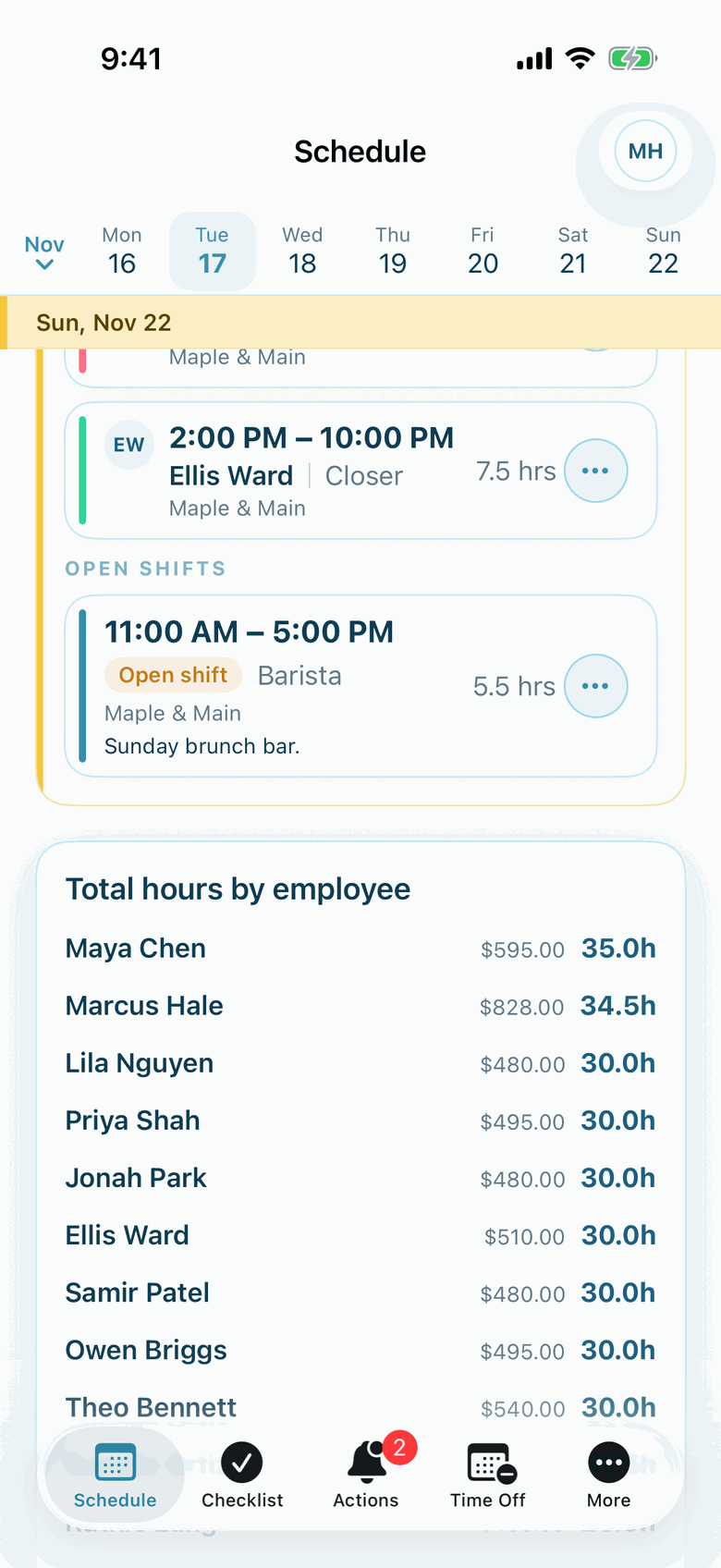
Actual Shiftway iPhone screen from a sample café workspace.
In the iPhone app
Hours before payroll asks
Each person's scheduled hours for the week, then the totals by day. With wages entered, you also see estimated pay, so an expensive week is visible while it is still a draft.
The iPhone app is included on Basic and Pro. Staff without an iPhone use the same workspace in a phone browser.
About the iPhone appFeatures, and why they matter here
The tools a store manager reaches for
Weekly schedule builder
Basic + ProDepartments and keyholders as positions, color-coded across the week.
Availability management
Basic + ProRecurring and one-off unavailable hours, with warnings while you schedule.
Time off
Basic + ProRequests with dates and notes, reviewed in one inbox.
Shift swaps
Basic + ProCoworker accepts, manager approves, and the schedule updates.
Announcements
Basic + ProPin holiday hours, promotions, or a policy change where everyone will see it.
Busy-day highlights
ProHoliday and seasonal busy periods marked on the grid. A planning cue, not a forecast.
Locations
Basic + ProA second or third store, each with its own weekly schedule.
An honest fit check
Is Shiftway a fit for your store?
Shiftway fits when you have
- A single store on Basic, or several stores on Pro
- Managers who build the week by hand and want it on their phone
- Teams with students and part-time associates
- Up to 50 people free
Look elsewhere if you need
- Schedules generated from foot traffic or sales data
- POS, payroll, or HR integrations
- Labor budgets set centrally and enforced by the software
- Commission or sales tracking
Questions
Shiftway for retail: common questions
How do I make sure a keyholder is on every open and close?
Create a Keyholder position and use it for opening and closing shifts. It shows in its own color, and you can filter the week to that position to check every open and close at once. Shiftway does not block publishing if one is missing, so the final check is yours.
Can I schedule by department?
Yes. Create a position for each department or role, such as register, sales floor, stock, or fitting rooms. Positions belong to the shift, so the same employee can work different departments on different days.
Does Shiftway forecast store traffic?
No. Pro's Busy-day highlights mark holidays and nearby busy periods from a fixed calendar, such as Thanksgiving and Black Friday. They do not use sales, foot traffic, or weather, and they do not recommend a headcount.
Can part-time employees set their own availability?
Yes, if you allow it. Employees can record recurring unavailable hours and one-off dates, and managers choose whether employees can edit their own.
What does Shiftway cost for more than one store?
Basic covers one location and up to 50 employees for free. Pro has no location cap and is billed per active location: $49 per location per month, or $470.40 per location per year.
Build next week's store schedule
Create a free workspace for your store, add your departments as positions, and put the keyholders in first.
Basic is free forever for one location and up to 50 employees. No credit card.