Restaurant scheduling
Write the restaurant schedule around the rush, not the group text
Shiftway puts front of house and back of house on one weekly grid. You see each day's hours and estimated labor while you build, publish when the week is right, and handle the Friday call-out with an open shift instead of a round of texts.
Basic is free forever for one location and up to 50 employees. No credit card.
Sample week: a neighborhood restaurant, lunch and dinner
Illustrative sample| Team | Mon | Tue | Wed | Thu | Dinner rushFri | Dinner rushSat | BrunchSun | Week |
|---|---|---|---|---|---|---|---|---|
| Front of house | ||||||||
| DanaServer | Off | 11a–3p | 11a–3p | 11a–3p5p–10p | 4p–11p | 4p–11pCalled out | 9a–3p | 30 h |
| RafaelServer | 4p–10p | 4p–10p | Off | 4p–10p | 4p–11p | 4p–11p | Off | 32 h |
| Open shiftServer | Off | Off | Off | Off | Off | 4p–11pCovers the call-out | Off | Unassigned |
| ImaniHost | Off | Off | 4p–9p | 4p–9p | 4p–10p | 4p–10p | 9a–2p | 27 h |
| TheoBartender | 4p–11p | Off | 4p–11p | 4p–11p | 5p–12a | 5p–12a | Off | 35 h |
| Back of house | ||||||||
| MarcoLine cook | 10a–4p | 10a–4p | 10a–4p | Off | 3p–11p | 3p–11p | 8a–3p | 41 h |
| AnaLine cook | Off | 3p–10p | 3p–10p | 3p–10p | 3p–11p | 3p–11p | Off | 37 h |
| KenjiPrep | 7a–1p | 7a–1p | Off | 7a–1p | 7a–2p | 7a–2p | Off | 32 h |
| LuisDish | 4p–10p | Off | 4p–10p | 4p–10p | 5p–12a | 5p–12a | 9a–3p | 38 h |
| Hours | 31 h | 29 h | 35 h | 46 h | 57 h | 50 h | 24 h | 272 h |
| Est. labor | $407 | $409 | $487 | $549 | $756 | $705 | $332 | $3,643 |
Estimated from sample hourly wages. Excludes overtime premiums, taxes, and tips. Open shifts count once assigned.
The real problems
Where a restaurant week usually breaks
None of these are exotic. They are the same four problems most restaurant managers deal with every week.
01
The call-out two hours before dinner
A server texts at 3:40 on a Friday. The fix is usually a string of individual texts, and whoever answers first gets the shift, whether or not it puts them over 40 hours.
In Shiftway
Make the shift an open shift. Staff see it on the schedule and can request it, you approve the request, and the grid shows each person's weekly hours, including anyone over 40, before you say yes.
Open shifts on the weekly schedule02
Labor you only see after the week is over
Most managers learn a week ran heavy when the numbers come in. By then nothing can be done about Tuesday's extra closer.
In Shiftway
Enter hourly wages and Shiftway shows scheduled hours and an estimated labor cost for each day and the week while you draft. It is an estimate: it leaves out overtime premiums, taxes, and tips, and it does not read sales from a POS.
Hours and labor on the schedule03
Availability that lives in people's heads
A line cook with a second job, a server in school, a host who cannot do Sundays. If it is not written down, it gets scheduled anyway.
In Shiftway
Employees record recurring unavailable hours and one-off dates. Put someone on a shift that overlaps and the schedule warns you before you publish.
Availability management04
Front and back scheduled in two places
FOH on a whiteboard by the host stand, BOH on a sheet in the office. Nobody sees whether dish is covered on the night the dining room is full.
In Shiftway
Create positions like server, host, line cook, and dish. Every shift sits on one color-coded grid, and you can filter the week to a single position when you only want to look at the kitchen.
A worked example
How a restaurant manager runs the week in Shiftway
One manager, one location, about 20 people. This is the loop from Sunday night to the Friday call-out.
Sunday, after close
Copy last week
Most weeks look like the last one. Copy it forward, then change what is different: the server who asked off Thursday, the private party on Saturday.
Sunday
Check the dinner lines first
Filter to Server, then Line cook. Friday and Saturday dinner are where a missing person costs you the most.
Sunday
Read the numbers before anyone else does
Look at hours and estimated labor per day. If Tuesday looks heavy, cut a mid shift while the week is still a draft. Employees cannot see drafts.
Monday morning
Publish
Staff see their shifts in the Shiftway iPhone app or a phone browser. Swap and time-off requests come back to you in one place.
Friday, 3:40 PM
Fill the call-out
Edit the shift and mark it open. When someone requests it, check their hours for the week, approve, and the schedule updates for everyone.
Why it is built this way
Built by someone who still writes the schedule
Shiftway was built by a working manager who still makes a weekly schedule for an hourly team, usually not at a desk. Labor hours, availability nobody wrote down, and the shift that opens up an hour before it starts are the problems it was built around.
Read why Shiftway existsFeatures, and why they matter here
What restaurant managers use most
Weekly schedule builder
Basic + ProPositions for each station, doubles on the same day, and a week you can copy forward.
Open shifts
Basic + ProPost a shift that needs a body and approve who takes it.
Hours and labor estimates
Basic + ProDaily and weekly hours, estimated labor when wages are entered, and a flag for anyone over 40 hours.
Shift swaps
Basic + ProServers trade a shift; the coworker accepts and a manager approves.
Time off
Basic + ProRequests arrive with dates and a note, and conflicts show on the grid.
Time clock
ProClock-ins, breaks, and correction requests, exported as a timesheet CSV.
Busy-day highlights
ProMother's Day, Memorial Day, and Thanksgiving through New Year's flagged on the grid so you review coverage early.
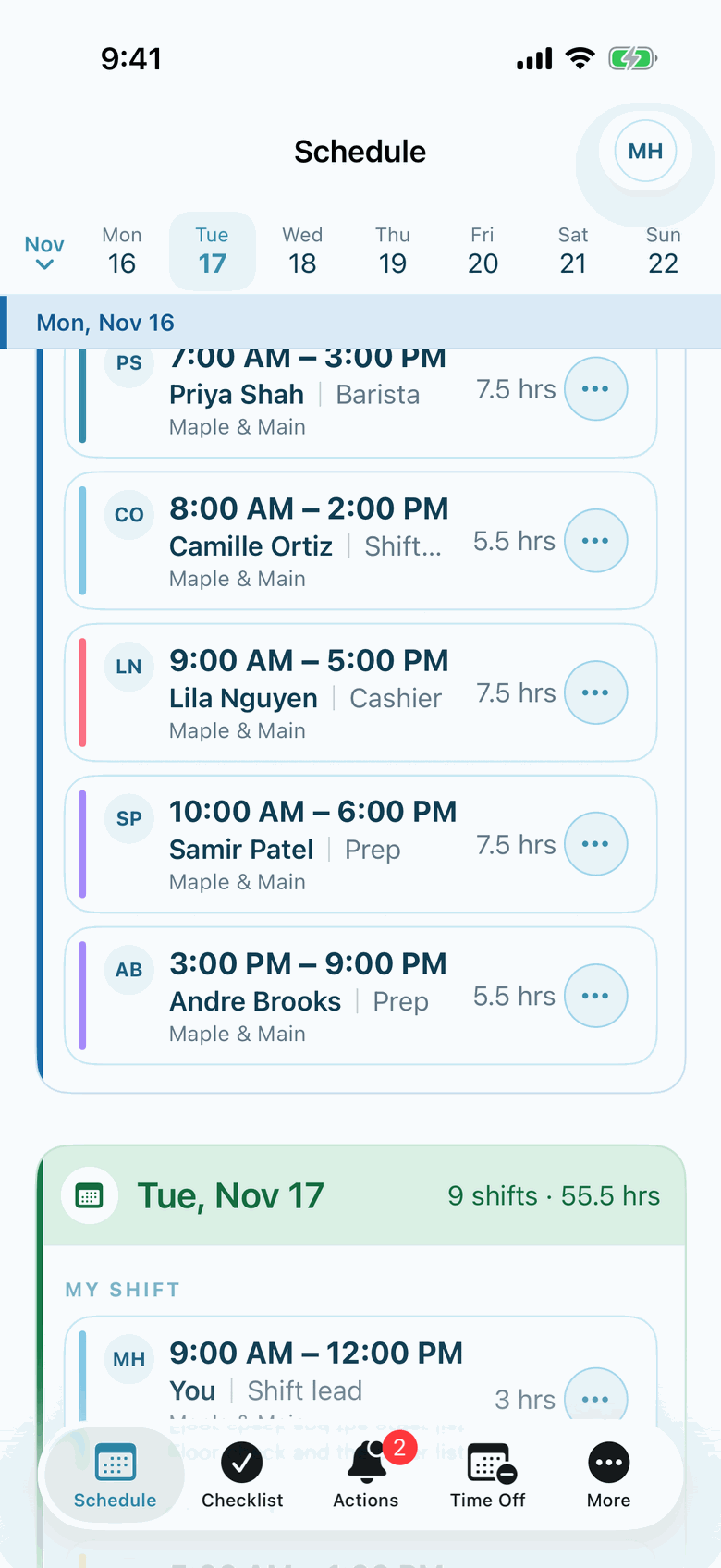
Actual Shiftway iPhone screen from a sample café workspace.
In the iPhone app
What your staff see on their phone
Employees open the published week and see who is on today, by position. Drafts stay hidden until you publish.
The iPhone app is included on Basic and Pro. Staff without an iPhone use the same workspace in a phone browser.
About the iPhone appAn honest fit check
Is Shiftway a fit for your restaurant?
Shiftway fits when you have
- One restaurant on the free Basic plan, or several locations on Pro
- A manager who builds the week by hand and wants to do it from a phone
- Up to 50 people free, front and back of house together
- Staff on iPhone or any phone with a browser
Look elsewhere if you need
- Schedules generated automatically from sales forecasts
- A POS or payroll integration. Shiftway does not connect to either
- Tip tracking or tip pooling
- A native Android app. Android staff use the mobile web workspace
Questions
Shiftway for restaurants: common questions
Can I schedule front of house and back of house separately?
They share one weekly schedule per location. Create positions for each station, then filter the grid by position when you want to look at the kitchen or the floor on its own.
Does Shiftway calculate restaurant labor cost?
It estimates it. With hourly wages entered, you see scheduled hours and an estimated labor cost for each day and the week. The estimate leaves out overtime premiums, taxes, and tips, and Shiftway does not import sales from a POS, so it cannot show labor as a percentage of sales.
How do I handle a call-out in Shiftway?
Edit the shift and make it an open shift. Employees at that location can request it, you approve the request, and the schedule updates. Team messages and the feed are there if you need to ask around.
Can servers swap shifts without asking me?
They can ask each other in Shiftway, but a swap needs the coworker to accept and a manager to approve before the schedule changes.
Is Shiftway free for a restaurant?
Basic is free forever for one location and up to 50 employees, with scheduling, open shifts, swaps, time off, availability, messaging, and the iPhone app. Pro is $49 per location per month and adds Time clock, SMS alerts, Busy-day highlights, and room for more people and locations.
Put next week on the grid
Create a free workspace, add your positions, and draft next week before Sunday night.
Basic is free forever for one location and up to 50 employees. No credit card.