Clinic & practice scheduling
Staff the clinic week without a spreadsheet for every role
Small practices run on a few people covering long days: a front desk that opens before the first patient, assistants who rotate Saturdays, a tech who works three days a week. Shiftway keeps that staff schedule, the requests around it, and the conversation about it in one place. It schedules your team, not your patients.
Basic is free forever for one location and up to 50 employees. No credit card.
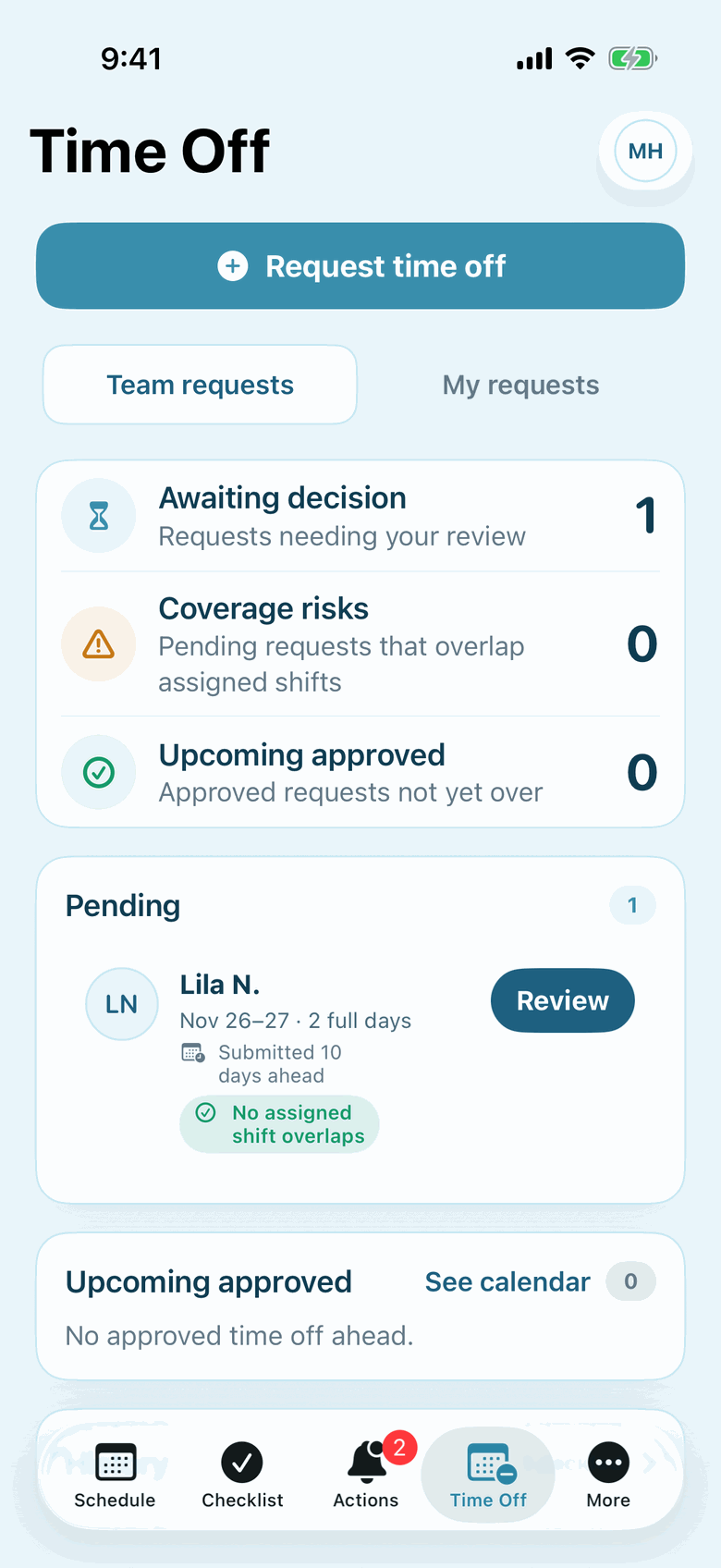
Actual Shiftway iPhone screen from a sample café workspace.
Time off with the reason attached. Requests arrive with dates and a note, and you approve or decline from one inbox. When you review a request, Shiftway shows whether it overlaps shifts that are already scheduled.
The real problems
What makes a clinic schedule hard to keep straight
The roles are few, but each one has a minimum, and the people filling them are often part-time.
01
Every clinic day needs the same minimum
You cannot open without someone at the front desk, and the morning check-in rush does not care who is on vacation.
In Shiftway
Build the standard week once with positions like Front desk, Medical assistant, and X-ray tech, then copy it forward and change only the exceptions. Filter by position to confirm each role is covered every day.
Weekly schedule builder02
Rotating Saturdays nobody can check
Whoever covered the last three Saturdays will remind you. A rotation kept in your head is one nobody else can verify.
In Shiftway
Copy a week and paste it into a later week to repeat a pattern. Past weeks stay in the schedule, so the history is there when someone asks. Shiftway does not create rotations automatically.
03
Two people want the same Friday off
Requests come by text, sticky note, and hallway conversation, and the second one arrives after you already said yes to the first.
In Shiftway
Time-off requests come into one inbox with dates and a note. When you review a request, Shiftway shows whether it conflicts with shifts already on the schedule.
Time-off requests04
A sick call before the first appointment
A medical assistant is out at 6:45 AM and you need someone in by 7:30.
In Shiftway
Make the shift an open shift so staff at that location can request it, approve the right person, and use team messages to reach someone directly.
What the week looks like
A rotation anyone can check
Sample two-week pattern: alternating Saturdays
Illustrative sample| Team | Mon | Tue | Wed | Thu | Fri | Sat | Week |
|---|---|---|---|---|---|---|---|
| Week A | |||||||
| RosaFront desk | 7:30a–4p | 7:30a–4p | 7:30a–4p | 7:30a–4p | 7:30a–4p | Off | 42.5 h |
| BenFront desk | 11a–7p | 11a–7p | Off | 11a–7p | 11a–7p | 8a–12:30p | 36.5 h |
| KeishaMedical assistant | 7:30a–4p | 7:30a–4p | 7:30a–4p | 7:30a–4p | Off | 8a–12:30p | 38.5 h |
| OmarMedical assistant | 10:30a–7p | Off | 10:30a–7p | 10:30a–7p | 7:30a–4p | Off | 34 h |
| LenaX-ray tech | 8a–4:30p | Off | 8a–4:30p | Off | 8a–4:30p | Off | 25.5 h |
| Week B | |||||||
| RosaFront desk | 7:30a–4p | 7:30a–4p | 7:30a–4p | 7:30a–4p | Off | 8a–12:30p | 38.5 h |
| BenFront desk | 11a–7p | 11a–7p | 11a–7p | 11a–7p | 7:30a–4p | Off | 40.5 h |
| KeishaMedical assistant | 7:30a–4p | 7:30a–4p | 7:30a–4p | 7:30a–4p | 7:30a–4p | Off | 42.5 h |
| OmarMedical assistant | 10:30a–7p | Off | 10:30a–7p | Off | 10:30a–7p | 8a–12:30p | 30 h |
| LenaX-ray tech | 8a–4:30p | Off | 8a–4:30p | Off | 8a–4:30p | Off | 25.5 h |
| Hours | 84 h | 50 h | 76 h | 58.5 h | 67.5 h | 18 h | 354 h |
A worked example
A sick call before the first appointment
A small practice with two front-desk staff, two medical assistants, and a part-time tech.
6:40 AM
The message comes in
A medical assistant messages that they are sick. The conversation is in Shiftway, next to the schedule, instead of a personal phone number.
6:45 AM
Open the shift
Edit today's shift and mark it open. It appears on the schedule for staff at the clinic.
6:55 AM
Approve the request
A part-time assistant requests it. You check their hours for the week, approve, and the schedule updates.
Later that day
Record the absence
The employee submits a time-off request for the date, so the record matches what actually happened.
Features, and why they matter here
What a practice manager uses
Weekly schedule builder
Basic + ProPositions for each role, with the week filtered to one role when you need it.
Copy and paste weeks
Basic + ProCopy a week and paste it later to repeat a rotation.
Availability management
Basic + ProRecurring hours a part-timer cannot work, with a note, and a warning when you schedule over them.
Time off
Basic + ProOne inbox for requests, with a check against shifts already scheduled.
Team messaging
Basic + ProReach a teammate inside the workspace instead of a personal number.
Open shifts
Basic + ProPost an uncovered shift and approve who takes it.
An honest fit check
Where Shiftway fits in a practice, and where it does not
Shiftway fits when you have
- Outpatient clinics, dental and therapy offices, and similar small practices
- Scheduling front desk, assistants, techs, and other staff
- Teams that plan the week by hand today
- Up to 50 staff on one location for free
Look elsewhere if you need
- Patient appointment booking or reminders
- Patient or health information. Shiftway is not designed for it and does not claim HIPAA compliance
- License, certification, or credential tracking
- Hospital-scale nurse scheduling with acuity, union, or float-pool rules
Questions
Shiftway for healthcare: common questions
Is Shiftway HIPAA compliant?
Shiftway does not claim HIPAA compliance and is not designed to store patient information. Use it for staff schedules, and keep patient names and health details out of shift notes, messages, and posts.
Can Shiftway schedule patient appointments?
No. It schedules your staff. Keep using your practice-management or booking system for patients.
Can I set up rotating weekends?
Yes, by copying. Build one week, copy it, paste it into a later week, and change who works Saturday. Shiftway does not generate rotations on its own.
Does Shiftway track licenses or certifications?
No. There is no credential or license tracking. Keep those records in your HR system.
Can staff see the schedule on their phones?
Yes. Basic and Pro include the Shiftway iPhone app, and the workspace works in a phone browser.
Set up your clinic's standard week
Create a free workspace, add your roles as positions, and build the week you will copy forward.
Basic is free forever for one location and up to 50 employees. No credit card.